Quick Verdict: a solid pick for digital nomads who hate carrying extra bricks; skip it if you only charge a single phone at your nightstand.
Introduction to the Power Brick
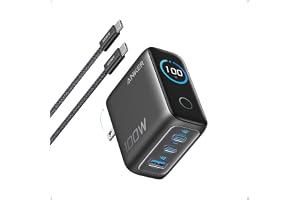
Enter the Anker 100W Max USB C Charger, a palm-sized power supply designed to streamline how you juice up your mobile gear. Anker has been a household name in portable power for years, and they keep pushing boundaries with their latest multi-port designs. This particular model aims to solve the classic desk clutter problem by packing serious wattage into a tiny footprint.
View Deal on Amazon →
When you unbox it, you immediately notice how heavy it feels relative to its size. That dense heft comes from upgraded internal components that manage heat much better than older silicon chargers. It is built for folks who live out of their backpacks and demand reliable electricity wherever a wall outlet happens to be.
Key Features and Specifications
At its core, this accessory relies on advanced gallium nitride circuitry to keep operating temperatures low while pushing out massive amounts of juice. The three-port layout gives you two USB-C connections and a single USB-A slot, letting you plug in multiple devices simultaneously without hunting for extra adapters. When you max out the primary port alone, it delivers a full hundred watts, which is plenty of headroom for demanding machines like a 16-inch MacBook Pro.
The standout physical addition here is a built-in smart display that shows real-time wattage distribution across your connected devices. You do not have to guess whether your laptop is actually fast-charging or trickling along at a slower rate anymore. Touch controls on the surface let you cycle through display modes or check specific port metrics with a quick tap.
Putting a heavy-duty charger through its paces means testing it with real hardware under actual daily stress. Plugging a drained work laptop into the top port alongside an iPhone and a set of wireless earbuds draws an immediate power handshake from the brick. The front screen lights up to show individual wattage numbers, shifting dynamically as each gadget demands more or less current.
Thermal management during these heavy sessions is remarkably stable, even when pushing close to maximum capacity for an hour straight. The casing gets warm to the touch, certainly, but never uncomfortably hot or alarming. Toss it into a canvas side pocket when you pack up for the day, and it takes up roughly half the space of the stock Apple power adapter.
Pros and Cons
Every piece of tech has its compromises, and a high-end power accessory is no exception to the rule. Weighing the advantages against the drawbacks helps paint an honest picture of what you are actually buying for your money.
Here are the primary advantages you get out of the box:
- Tiny footprint that easily fits into crowded wall sockets behind a couch or desk.
- Real-time screen feedback takes the guesswork out of multi-device charging speeds.
- Sufficient wattage headroom to power a hungry mobile workstation with ease.
On the flip side, a few minor limitations are worth keeping in mind before you purchase:
The glossy plastic finish on the housing tends to pick up fine hairline scratches if you toss it loose into a bag with keys or coins. Additionally, when you plug or unplug a device, the power briefly redistributes across all ports, causing the screen to flash and temporarily pause charging for a split second.
Who It Is For and Who Should Skip It
If you are a remote worker, freelance designer, or frequent flyer who relies on multiple USB-C gadgets every single day, this device fits right into your workflow. It replaces a tangled mess of individual bricks with one streamlined wall plug that handles your entire daily carry. Anyone trying to lighten their daily backpack load will appreciate the sheer convenience of leaving redundant chargers at home.
Conversely, if your daily setup only involves a single smartphone and a smartwatch plugged in next to your bed, paying extra for high-wattage capacity and display tech is probably overkill. People who rarely travel and already have a drawer full of functional stock adapters can safely pass on this upgrade without missing out.
Value for Money
When you look at the pricing for premium multi-port power accessories, you definitely pay a bit extra for advanced semiconductor tech and integrated screens. You are essentially paying for reliability, brand-backed safety protections, and the luxury of seeing exact power delivery stats right on the housing. For anyone whose livelihood depends on keeping expensive electronics running smoothly on the go, that investment easily justifies itself over time.
Cheaper third-party alternatives exist online, but they often cut corners on thermal regulation and multi-port power sharing logic. Anker backs this hardware with a solid warranty and reliable customer support, which offers genuine peace of mind when you are plugging a two-thousand-dollar laptop into an unknown wall outlet.
Frequently Asked Questions
Does it support fast charging for non-Apple laptops like Dell or Lenovo?
Yes, it uses standard Power Delivery protocols, so it negotiates fast-charging speeds seamlessly with most modern Windows laptops.
Does the display stay lit all night if I use it by my bed?
The screen dims or turns off automatically after a brief period of inactivity so it won't keep you awake in a dark room.
Will it get hot if I use all three ports at the same time?
It gets warm under a heavy multi-device load, but internal thermal guards prevent it from overheating.
Verdict
At the end of the day, the Anker 100W Max USB C Charger brings a fantastic blend of raw power and smart design to a very crowded market. The addition of a real-time display elevates it above standard utility bricks and turns a boring accessory into a genuinely useful desktop tool. If you are ready to declutter your workspace and speed up your daily charging routine, check out current pricing online and grab one for your bag.