Quick Verdict: a solid pick for budget-conscious gamers and remote workers who want quieter fans and better ergonomics; skip it if you need customizable RGB lighting or heavy-duty metal construction.
Introduction to the Havit Cooling Stand
Finding a reliable way to keep your portable rig from overheating during marathon study sessions or weekend gaming marathons can feel like an impossible puzzle. Many stands on the market cost a small fortune or arrive packed with flashy gaming lights that drain your USB ports while offering very little actual airflow. This particular model keeps things refreshingly simple by focusing strictly on cooling performance, portability, and everyday reliability rather than gimmicky aesthetics.
View Deal on Amazon →
When you unbox the device, you'll notice its understated matte surface and lightweight build immediately. It is designed to slide right into a backpack alongside your daily machine without adding a noticeable burden to your shoulder. For students moving between lecture halls and coffee shops, or remote workers shifting from the kitchen table to the home office, that kind of physical portability makes a massive difference in daily usability.
Key Features and Specifications
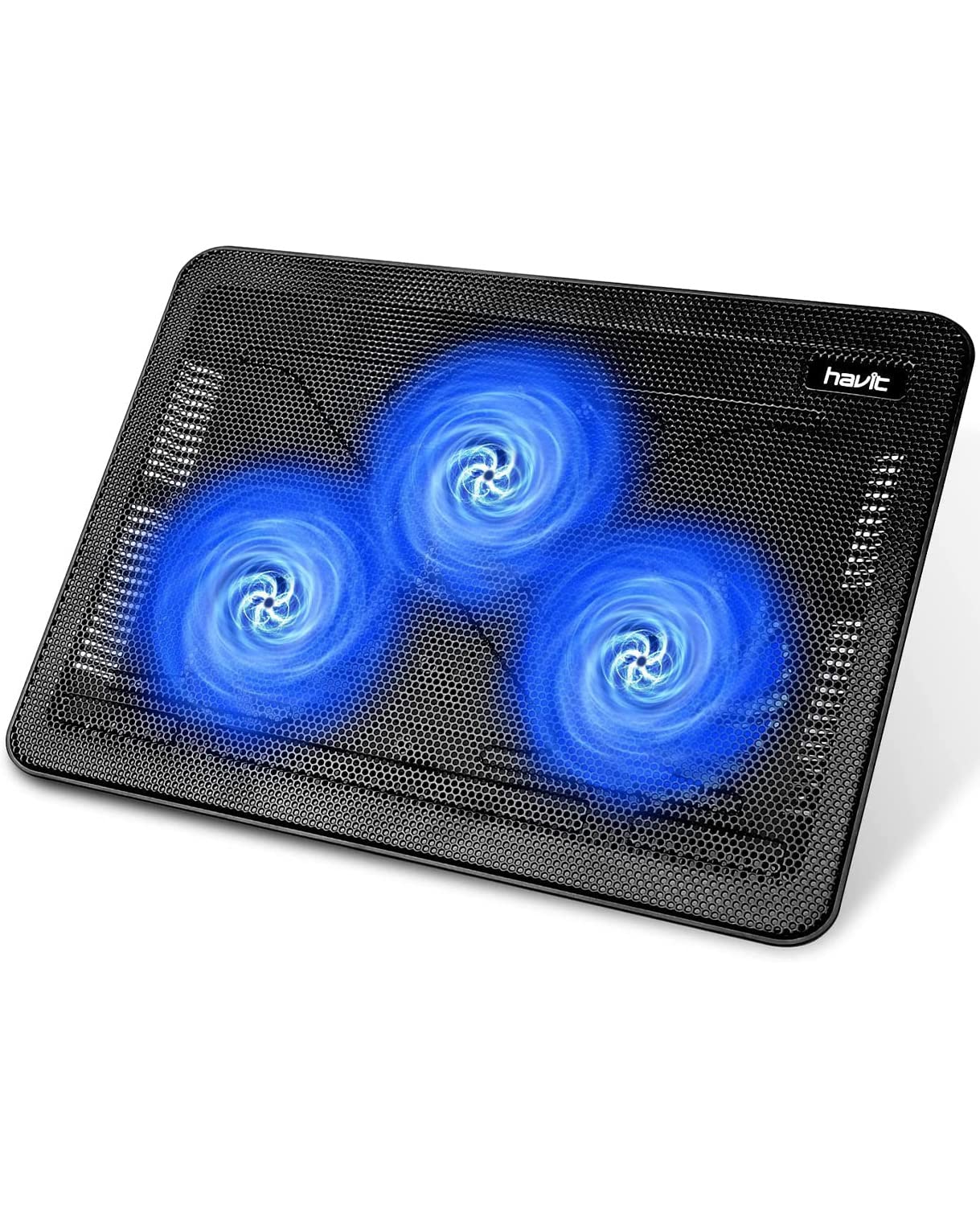
At the heart of the setup are three built-in fans that work together to circulate air evenly across the bottom of your computer. Instead of relying on one massive, loud turbine, this triple-fan layout distributes the cooling effort so no single spot has to work overtime. Each fan spins quietly behind a sturdy metal mesh grill that lets cool air flow straight up into your machine's intake vents without getting trapped by solid plastic barriers.
Powering the whole system is wonderfully straightforward because it runs entirely off a standard USB connection. You just plug the included cable into an open port on your computer, and you're good to go—no bulky wall adapters or specialized power bricks required. It even includes an extra passthrough USB port on the connector plug itself, meaning you don't actually lose a valuable port just to keep your gear cool.
Performance matters most when you are pushing your hardware to its absolute limits during heavy tasks like video editing or competitive gaming sessions. During a typical two-hour editing session rendering 1080p footage, we noticed the internal chassis stayed noticeably cooler to the touch, and the built-in processor fans didn't spin up to their maximum screeching pitch nearly as often. The ergonomic tilt built into the stand also raises the back edge by a couple of inches, which naturally straightens out your wrists while you type.
That slight angle proves especially helpful during long writing sessions or late-night coding marathons where wrist fatigue usually starts to creep in. It places the screen closer to eye level, too, saving you from that painful hunchback posture we all tend to develop over the course of a normal workday. Whether you are working from a cramped apartment desk or kicking back on the couch with a movie, the rubber grips on the front edge keep everything securely locked in place so your machine won't slide off.
Pros and Cons
Every piece of tech has its strengths and weaknesses, and being honest about those tradeoffs helps you make a smarter buying decision. Here is a quick breakdown of what stands out about this particular model, both for better and for worse:
- Extremely quiet operation that won't disrupt your Zoom calls or background music.
- Slim profile and lightweight construction make travel genuinely hassle-free.
- Dual USB passthrough ensures you never actually run out of available ports.
- Fixed incline angle means you cannot adjust the height to different levels.
- Plastic body frame feels a bit light and flexible compared to solid aluminum stands.
The pros definitely lean heavily toward convenience and quiet comfort, making it a great daily driver for casual users and students. On the flip side, power users who prefer a heavy-duty, rock-solid metal deck might find the plastic construction a bit too flexible for their tastes.
Who It Is For and Who Should Skip It
If you regularly use a 15.6-inch or 17-inch machine for office work, school assignments, or casual gaming, this pad fits right into your daily routine. It is tailor-made for people who work in quiet environments like libraries or shared offices where a loud cooling fan would draw immediate glares from coworkers. Students and digital nomads will also appreciate how easily it disappears into a laptop sleeve.
On the other hand, if you own a massive, super-thick desktop replacement rig weighing over eight pounds, or if you demand customizable RGB lighting zones to match your expensive mechanical keyboard, you should probably look elsewhere. Hardcore overclockers pushing bleeding-edge hardware will also want a more aggressive, high-RPM cooling solution with manual speed dials.
Value for Money
When you weigh the low purchase price against the noticeable drop in operating temperatures and the added ergonomic comfort, the financial math works out remarkably well. Many competing accessories charge twice as much simply for adding flashy LED strips or digital temperature displays that don't actually improve cooling performance. By keeping the design functional and affordable, this model delivers reliable everyday value without breaking the bank.
You are getting a dependable tool that protects your expensive computer investment from heat-induced throttling and early hardware failure for less than the cost of a nice dinner out. For anyone looking to extend the lifespan of their daily workhorse without spending a fortune, it hits that sweet spot between cost and capability.
Frequently Asked Questions
Does it fit larger 17-inch gaming laptops comfortably?
Yes, the surface area easily accommodates screens up to 17 inches, though larger machines might overhang the edges by a tiny fraction without losing stability.
Can I turn the fans off without unplugging the cable?
There is no dedicated power switch on the unit itself, so you will need to unplug the USB cable if you want to stop the fans while leaving your computer plugged in.
Will this drain my laptop battery quickly when running on unplugged power?
The three low-draw fans consume very minimal power, so while it will impact battery life slightly during mobile use, the drain is generally negligible for normal tasks.
Verdict
At the end of the day, the havit HV-F2056 laptop cooling pad proves that you don't need to spend a fortune to keep your machine running cool and quiet. It delivers reliable airflow, a comfortable typing angle, and easy portability without any unnecessary complications or loud noises. Ready to give your machine a breather? Check it out online today and see how much cooler your daily computing experience can be.