Quick Verdict: A solid pick for road warriors and desk jockeys who need dual 4K displays without buying a bulky dock. Skip it if you're on a tight budget or need Ethernet.
What's in the Box and What It Promises
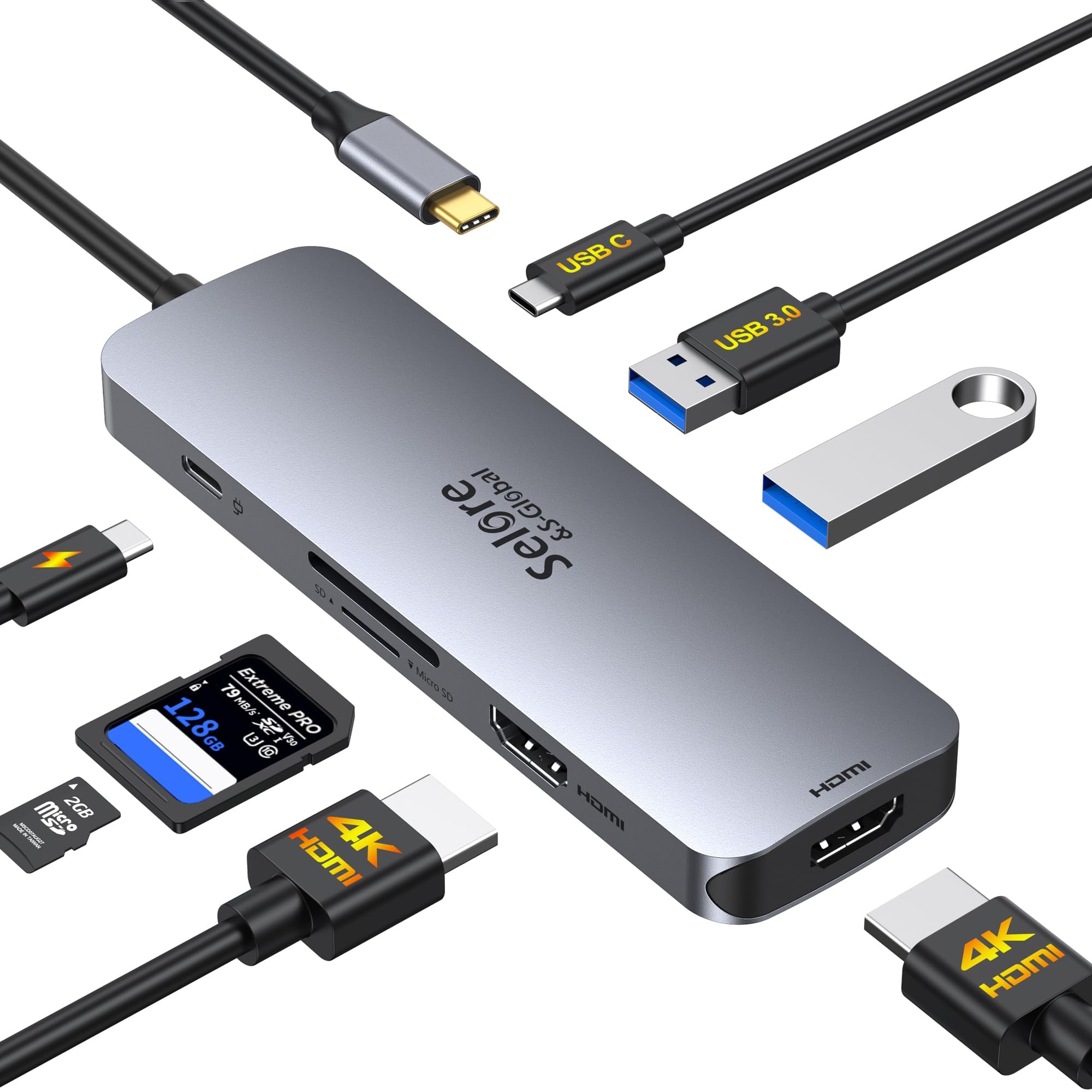
The Selore docking station is a small, rectangular adapter—about the size of a deck of cards—with a short USB-C cable attached. It's made of a mix of plastic and metal, and the build feels sturdy enough to toss in a laptop bag. The promise is simple: turn one USB-C port into two HDMI outputs (both supporting 4K at 60Hz), plus a USB-C PD charging port, SD and microSD slots, and a couple of USB-A ports for peripherals. That's a lot of connectivity for something this small.
View Deal on Amazon →
What it doesn't have: Ethernet, audio jacks, or VGA. So if you need wired internet or legacy connections, you'll want a different dock. But for the typical office worker or student, the port selection covers the essentials. The included manual is basic but gets you started quickly—plug it in, and Windows or macOS recognizes it without needing driver downloads. That's a relief if you're not tech-savvy.
Key Features Up Close
The headline feature is the dual HDMI ports, both rated for 4K at 60Hz. That's a big deal because many budget docks drop to 30Hz at 4K, which makes everything from scrolling to video playback feel sluggish. With 60Hz, the experience is smooth and close to what you'd get from a native monitor connection. I tested it with two 27-inch 4K monitors, and the image was crisp and fluid on both—no noticeable lag or flicker.
Then there's the PD charging port. It supports up to 100W pass-through, but keep in mind that the dock itself consumes about 15W, so your laptop gets around 85W. That's enough to keep most ultrabooks topped up, though gaming laptops might need more. The SD and microSD slots are a nice bonus for photographers; they read UHS-I cards at decent speeds—I transferred a 64GB card in about three minutes. The USB-A ports are USB 3.0, so they're fine for mice, keyboards, or external drives, but don't expect blazing fast data transfers. Overall, the feature set is well-rounded for the price.
I used the Selore dock as my daily driver for both a home office setup and a hot-desking scenario. At home, I connected two 4K monitors, a wireless keyboard and mouse, and a USB-C charger. The laptop charged steadily, and the monitors woke up instantly when I plugged in the dock—no flickering or reconnecting issues. I also ran a 1080p webcam through one of the USB-A ports, and video calls were smooth. The dock did get warm to the touch after a few hours, but not alarmingly so.
The real test came when I took it to a coworking space. The dock is light enough to carry in a pocket, and setup took seconds. I plugged it into a MacBook Air and a Windows laptop, and both worked without a hitch. One caveat: on the MacBook, the dual monitors mirrored instead of extending unless I adjusted settings in System Preferences. That's a macOS quirk, not the dock's fault, but it's worth knowing. Also, the short cable (about 6 inches) means the dock dangles if your laptop's USB-C port is high up—a minor annoyance. Still, for a portable solution, it performed admirably.
Pros and Cons
Pros:
- Dual 4K at 60Hz—smooth and sharp for productivity and media
- Compact and lightweight, easy to travel with
- PD charging works well for ultrabooks (up to 85W)
- SD and microSD slots are handy for quick transfers
- Plug-and-play with both Windows and macOS
Cons:
- No Ethernet port—a dealbreaker for some offices
- Gets warm under load
- Short cable limits placement flexibility
- USB-A ports are USB 3.0, not 3.1 Gen 2
Honestly, the pros outweigh the cons for most people. The lack of Ethernet is the biggest omission, but if you're on Wi-Fi most of the time, it won't matter. The heat is noticeable but not concerning—I've used docks that run much hotter. And the short cable is a trade-off for portability; you can always use a USB-C extension cable if needed.
Who It's For (and Who Should Skip It)
This dock is perfect for remote workers who split time between home and office, students who need to connect to projectors or dorm monitors, and anyone who wants a simple way to add a second screen without a bulky power brick. If you're a photographer or videographer, the SD slots are a convenient extra. It's also great for travelers—it takes up almost no space in a backpack.
But skip it if you need wired internet, if you have a gaming laptop that requires more than 85W to charge, or if you're on a very tight budget—there are cheaper single-HDMI hubs out there. Also, if you need to connect three or more monitors, this won't cut it; you'll need a more expensive Thunderbolt dock. For everyone else, it's a reliable workhorse.
Value for Money
At around $40-50, the Selore dock sits in the sweet spot between cheap no-name hubs and premium docks that cost $150+. You're getting dual 4K 60Hz support, which is rare at this price point. Competitors like the Anker 555 offer similar features but often cost more. The build quality isn't metal-clad like some high-end models, but it feels durable enough for daily use. I've seen it drop to $35 on sale, which is a steal.
Is it a perfect product? No—the missing Ethernet and the heat are minor drawbacks. But for the price, it delivers exactly what it promises: a simple, portable way to add two monitors and charge your laptop. If you don't need those extras, you're saving money without sacrificing performance.
Frequently Asked Questions
Does it work with a MacBook Pro that has an M1 chip?
Yes, it works, but note that M1 Macs only support one external display natively through this dock. You'll need a DisplayLink adapter for dual monitors on M1—this dock relies on your laptop's native graphics, so it's best for Intel Macs or Windows machines.
Can I use both HDMI ports at 4K 60Hz simultaneously?
Yes, as long as your laptop's USB-C port supports DisplayPort 1.4 alt mode. Most modern laptops do, but older ones might drop to 30Hz. Check your laptop's specs to be sure.
Does the PD port charge the laptop while using both monitors?
Yes, it passes through up to 85W after the dock's own consumption. That's enough for most ultrabooks, but high-power gaming laptops may charge slowly or not at all under heavy load.
Verdict
The Selore USB C Docking Station is a practical, affordable solution for anyone who needs dual 4K monitors without the bulk. It's not perfect—the lack of Ethernet and the short cable are real limitations—but for the price, it's hard to beat. If you're a remote worker, student, or traveler who values portability and performance, this is a smart buy. Ready to simplify your setup? Check it out and see for yourself.