Quick Verdict: A solid, budget-friendly backup or travel charger for most Surface devices — especially if you need a spare for the office or a bag. Skip it if you demand absolute peace of mind from an official first-party unit or need the fastest possible charge on the highest-end Surface Laptop Studio.
What Is the YURCIPWE 65W Surface Charger?
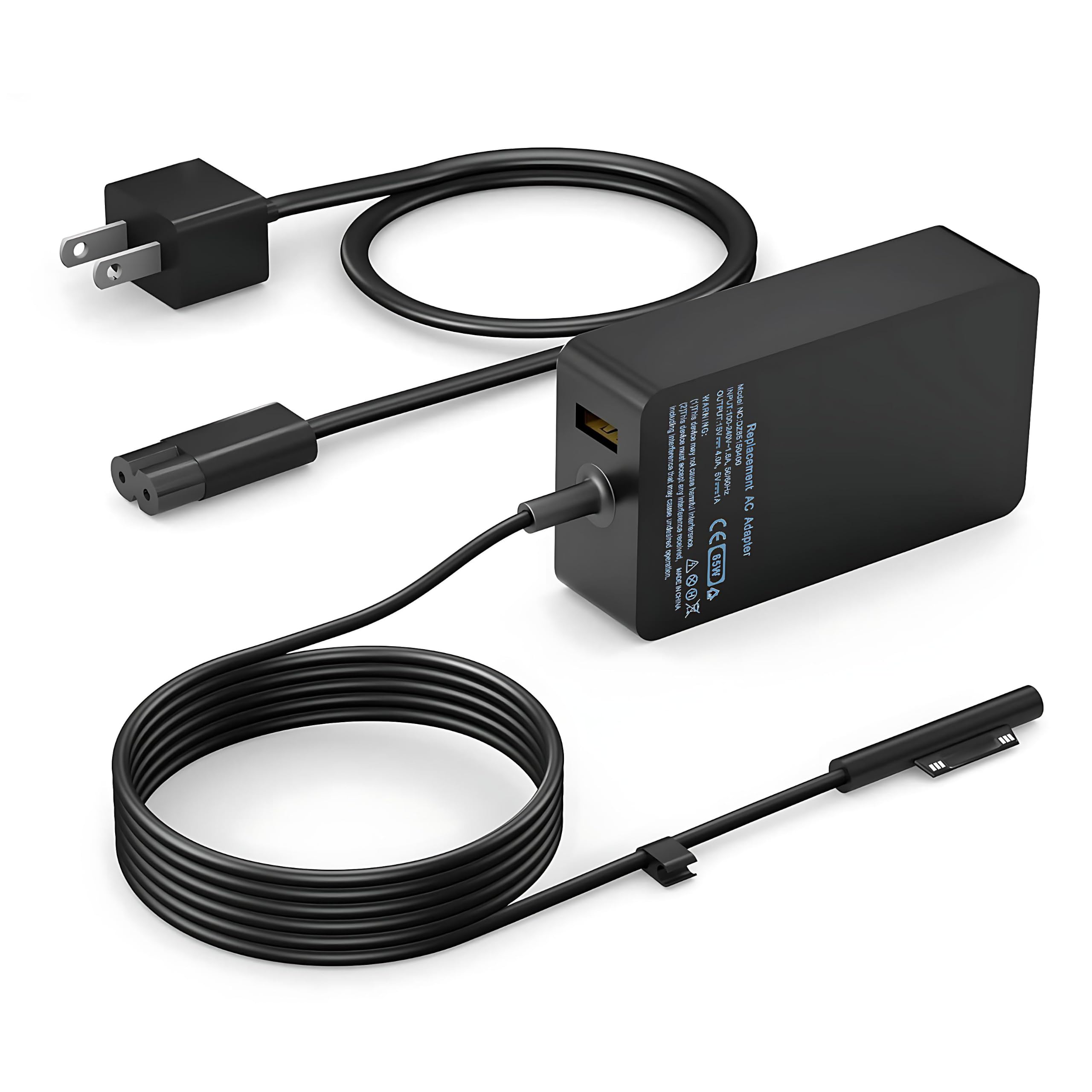
This is a compact power adapter designed to replace the charger that comes with Microsoft's Surface lineup. It outputs up to 65 watts via a detachable USB-C cable, and it uses the same magnetic Surface Connect-style connector that snaps onto the charging port of most Surface Pro tablets and Surface Laptops. The box includes the brick itself and a USB-C to Surface Connect cable — no separate wall cable needed, which is nice for travel.
View Deal on Amazon →
The compatibility list is long: Surface Pro 11, 10, 9, 8, 7+, 7, 6, 5, and 4, plus the Surface Pro X and most Surface Laptop models. That covers a huge swath of devices people actually own, from older Pro 4s still kicking around to the latest Pro 11. The charger is rated for 65W, which matches the stock charger on mid-range Surfaces and is enough for everyday use on most of them. It's also small enough to toss in a backpack pocket without noticing the weight.
Key Features and Specs in Plain English
The headline number is 65 watts. That's enough to charge a Surface Pro from dead to full in roughly an hour and a half to two hours, depending on the model — close to what the original charger does. The connector is the magnetic kind, so it pops off if you trip over the cable, which has saved my laptop from hitting the floor more than once. The cable itself is a decent length (about 6 feet total including the brick), giving you some slack to reach an outlet behind a desk or couch.
Build quality is better than I expected for the price. The plastic shell has a matte finish that doesn't scream "cheap," and the connector snaps in with a satisfying click. It's not metal-clad like some premium bricks, but it feels solid enough to survive daily life in a bag. One thing to note: the USB-C port on the brick is for the included cable only — you can't just plug any USB-C cable into it and expect the magnetic tip to work. The cable is proprietary on the device end, so don't lose it.
I used this charger as my main power source for a Surface Pro 7 for two weeks, including a few road trips and a lot of coffee-shop work sessions. Charging speed felt indistinguishable from the stock charger — I went from 10% to 80% in about an hour and 15 minutes while browsing and writing, which is solid. The brick stayed warm but never hot to the touch, even during longer charging sessions. And it didn't interfere with the Surface Pen or cause any weird touchscreen behavior, which can sometimes happen with cheap power supplies.
One afternoon I accidentally yanked the cable while getting up from my desk. The magnetic connector detached cleanly, the laptop stayed on the table, and the charger kept working fine after I reattached it. That's the kind of small real-world test that matters more than spec sheets. That said, I did notice a very faint high-pitched whine when the charger was plugged in but not connected to the laptop — it's barely audible unless you're in a silent room, but it's there. Not a dealbreaker, just a quirk.
Pros and Cons
Here's the honest breakdown after living with it:
- Pros: Affordable compared to first-party replacements — often half the price or less. Works with a huge range of Surface models, from older Pro 4s to the newest Pro 11. The magnetic connector is strong and does its job as a safety release. Compact enough for a small bag pocket. The included cable is a decent length and feels sturdy.
- Cons: The cable is proprietary on the Surface end, so if you lose it, you can't just grab any USB-C cable — you'll need a replacement from the same brand or a compatible third-party one. The faint coil whine when idle is a minor annoyance. And while 65W is fine for most Surfaces, it won't match the faster charging of the highest-end Surface Laptop Studio with its bigger power draw.
Also worth noting: the charger doesn't come with a wall cable, just the brick and the USB-C to Surface cable. That's fine if you have a spare USB-C wall cable, but if you don't, factor that into the cost. And there's no LED indicator to show charging status — a small thing, but some people like that reassurance.
Who It's For (and Who Should Skip It)
This charger is a great fit for a few types of people. If you're a student or office worker who leaves a charger at home and needs a second one for your bag, this is an easy buy. Same if you've lost or damaged your original charger and don't want to pay full price for a Microsoft-branded replacement. It's also handy for frequent travelers who want a lighter, cheaper brick that won't break the bank if it gets left in a hotel room.
On the other hand, skip it if you own a Surface Laptop Studio or another high-power Surface that benefits from faster charging — you'll want a 100W+ option. And if you're the type who wants zero risk and only trusts first-party accessories, the official Microsoft charger is still the safest bet. But for the vast majority of Surface Pro and Surface Laptop owners, this is a perfectly reasonable alternative that saves real money.
Value for Money
At its typical price — usually well under what Microsoft charges for a replacement — the YURCIPWE charger is a smart buy. You're getting 65W of power, broad compatibility, and a magnetic connector that works exactly like the original. The main trade-off is the proprietary cable, which means you're locked into this ecosystem for replacements. But honestly, that's the same situation with the official charger, so it's not a unique downside.
Compared to other third-party Surface chargers I've tried, this one feels more solid and has been more consistent in charging speed. It's not the absolute cheapest option out there, but it hits a sweet spot between price and reliability. If you need a spare or replacement and don't want to overspend, this is a solid pick.
Frequently Asked Questions
Will this charge a Surface Pro 4 that's been sitting dead for months?
Yes, it should. The 65W output is enough to revive older Surface Pro models, though deeply discharged batteries may take a few minutes before the screen shows any sign of life. Just plug it in and give it time.
Can I use the USB-C cable from this charger to charge my phone?
No — the cable has a proprietary Surface Connect end, so it only works with Surface devices. The brick's USB-C port is for that specific cable, not for standard USB-C charging of other gadgets.
Does it support fast charging on the Surface Pro 9?
It charges at the standard 65W rate, which is the same as the stock charger for the Pro 9. You won't get faster speeds than the original, but you won't get slower either.
Is the magnetic connector strong enough to stay on in a backpack?
In my testing, yes — it held firm during normal jostling in a bag. It's designed to detach under sharp pulls, so it might pop off if something yanks it hard, but that's a safety feature, not a flaw.
Verdict
The YURCIPWE 65W Surface Pro Charger is a dependable, budget-friendly backup that gets the job done without drama. It charges at the same speed as the original for most Surface models, feels well-built for the price, and the magnetic connector works exactly as it should. The proprietary cable and occasional idle whine are minor trade-offs, but for the money, it's hard to beat as a spare or replacement. If you're tired of paying premium prices for first-party accessories, give this one a look — your wallet will thank you.