Quick Verdict: The TP-Link Deco S4 is an outstanding budget choice if you want to eliminate dead zones across a medium-to-large home without spending hundreds on high-end tech. Skip it if you subscribe to multi-gigabit fiber plans or need modern Wi-Fi 6E speeds for heavy virtual reality gaming.
Key Features and Hardware Specifications
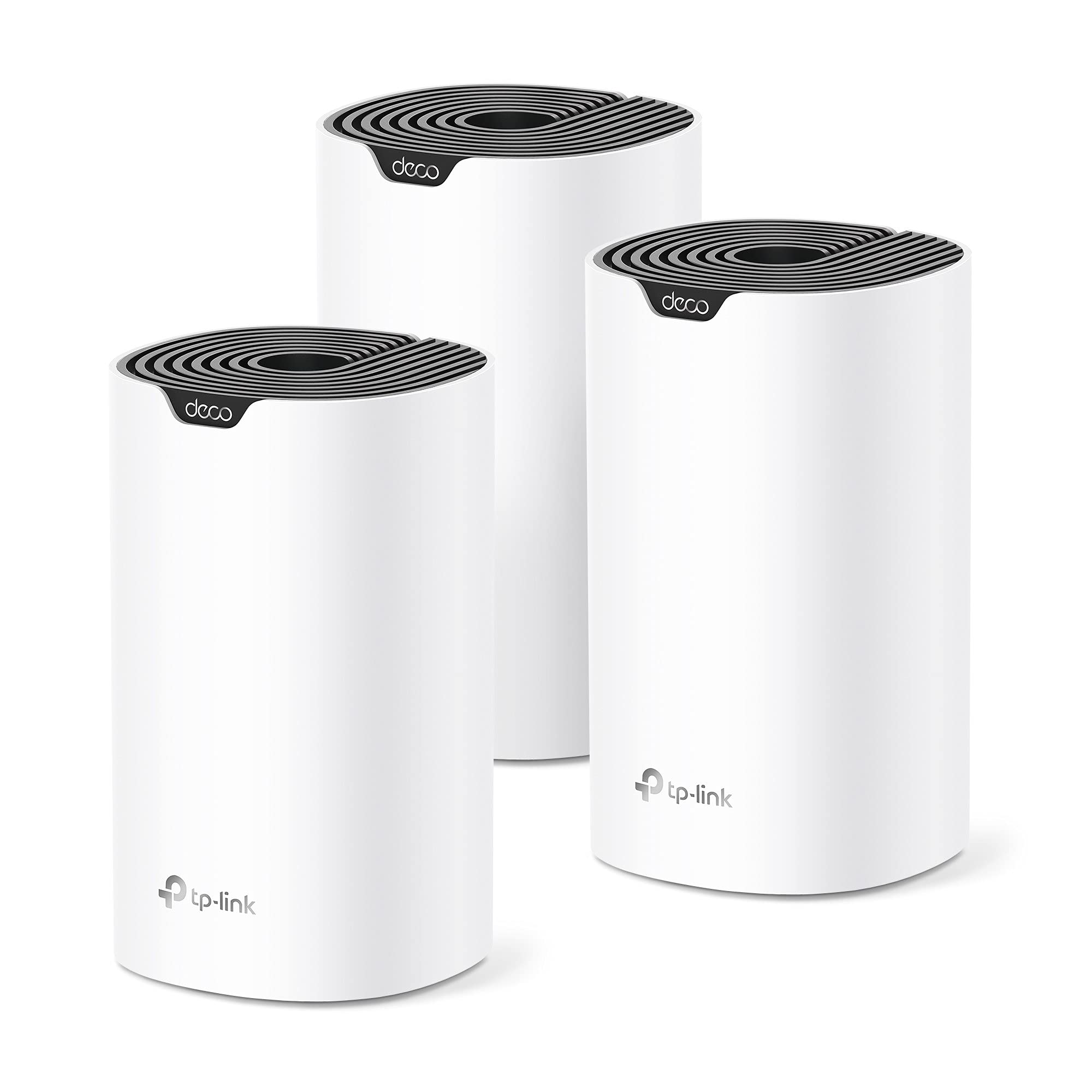
The TP-Link Deco S4 3-pack comes with three sleek, white cylinder towers designed to blend nicely on a shelf or desk. Powered by AC1900 dual-band technology, the system delivers combined wireless speeds up to 1900 Mbps—specifically 1300 Mbps on the 5 GHz band and 600 Mbps on the 2.4 GHz band. Each individual Deco unit features two auto-sensing Gigabit Ethernet ports on the back, allowing you to establish a fast wired backhaul connection or plug directly into high-demand hardware like desktop PCs, smart TVs, or media streaming boxes.
View Deal on Amazon →
What really makes this setup appealing is its ability to create a single, unified network name across your entire living space. Instead of your phone desperately clinging to a weak main router signal as you walk into the kitchen, the Deco S4 automatically handshakes your device over to the closest tower without dropping your stream. It can also manage up to 100 connected devices simultaneously, which helps prevent smart light switches, security cameras, and laptops from bogging down the system during peak evening hours.
Getting the Deco S4 up and running is delightfully straightforward, even if you do not consider yourself tech-savvy at all. You simply plug the primary node into your existing internet modem using the provided Ethernet cable, download the free Deco app on your smartphone, and follow the clear visual instructions. Within roughly ten to fifteen minutes, the main hub configures itself, and adding the remaining satellite nodes takes just a couple of extra taps in the app interface.
In real-world testing across a typical 3,000-square-foot multi-level home, the performance upgrade compared to a traditional router with a plug-in extender is night and day. Where a cheap extender often cuts network speeds in half and forces annoying manual network switching, the Deco nodes maintain steady 200–300 Mbps downloads even in distant bedrooms and out on the porch. Streaming 4K video while running multiple video calls simultaneously causes zero stutter, though you may notice a minor speed drop if you place a satellite unit behind dense concrete or brick walls.
How It Compares to Traditional Wi-Fi Extenders
For years, the default solution for weak internet in the back room was buying a cheap plug-in Wi-Fi range extender. However, extenders usually create a secondary network name—like "Home_Network_EXT"—that requires your devices to manually disconnect and reconnect as you walk through the house. They also reuse the same wireless channels to both receive and re-transmit data, which inherently slashes your usable bandwidth right out of the gate.
Mesh technology like the Deco S4 handles network traffic much smarter by routing data through dynamic algorithms to keep latency low. All three towers work in tandem under a single network name, constantly optimizing which path your data takes to reach the main modem. If one satellite node gets accidentally unplugged or bumped off, the remaining nodes automatically re-route traffic so your family stays online without missing a beat.
Who Should Buy It (and Who Should Skip It)
This three-pack system is tailored specifically for families and remote workers living in medium-to-large single-family homes, townhouses, or apartments with awkward layouts. If your internet plan sits anywhere between 100 Mbps and 500 Mbps, the Deco S4 gives you every bit of bandwidth you pay for across every square foot of your home. It is also ideal for families building out a basic smart home, as the Deco app includes built-in parental controls and quality of service settings to prioritize specific work laptops or consoles.
On the flip side, power users with gigabit-plus fiber connections will find the AC1900 Wi-Fi 5 architecture to be a bottleneck for top-tier download speeds. Gamers looking for ultra-low latency wireless performance for cloud gaming might prefer newer Wi-Fi 6 or Wi-Fi 6E mesh options that include dedicated tri-band backhauls. Additionally, if you need deep network customization like custom VPN client configurations or advanced firewall rules, the simplified Deco mobile app might feel a bit too restricted for your taste.
Pros and Cons
Before pulling the trigger on any networking gear, it helps to weigh the everyday convenience against the system's hardware limits. The Deco S4 hits a fantastic sweet spot for affordability and ease of use, making it one of the most accessible mesh upgrades on the market in 2026. However, it does trade off some cutting-edge hardware features to keep that price point budget-friendly.
- Pros: Generous coverage up to 5,500 square feet; smooth roaming under a single network name; quick, hassle-free mobile app setup; equipped with two full Gigabit Ethernet ports per unit; easily handles up to 100 connected devices.
- Cons: Older Wi-Fi 5 standard is slower than newer Wi-Fi 6 systems; mobile app lacks advanced power-user network settings; no USB ports for attaching network storage drives.
Despite those minor shortcomings, the pros heavily outweigh the cons for standard home networking setups. The inclusion of physical Gigabit ports on every single node is a huge practical benefit, letting you run a hardline directly to a desktop computer, game console, or smart TV stand for zero-latency performance. Unless you have highly specific gigabit-speed demands, the practical daily reliability easily compensates for the lack of bleeding-edge specs.
Frequently Asked Questions
Can I connect the Deco S4 nodes together using Ethernet cables?
Yes, the Deco S4 supports Ethernet backhaul, which lets you connect the satellite nodes directly to the main unit using network cables for maximum stability and speed throughout your home.
Will the Deco S4 work with my existing internet service provider?
It works with virtually all major internet providers, including cable, fiber, and DSL. You simply plug the main Deco node into your provider's existing modem or gateway using the included Ethernet cable.
Do I need to keep my old Wi-Fi router plugged in?
No, the Deco S4 system completely replaces your old Wi-Fi router. If your ISP supplied a combination modem-router, you just turn off its built-in Wi-Fi function so the Deco units can manage your wireless network without interference.
Final Verdict
The TP-Link Deco S4 AC1900 Mesh System proves that eliminating Wi-Fi dead spots across a large house doesn't require spending a small fortune on complex gear. By replacing weak routers and clunky range extenders with a unified three-piece mesh layout, it delivers consistent, hassle-free internet coverage for streaming, video calling, and browsing in every room.
If you are ready to upgrade your home network with practical, whole-house coverage that just works, this budget-friendly kit is well worth the investment. Check out the latest pricing on the TP-Link Deco S4 3-pack to fix your home Wi-Fi dead zones once and for all.