Quick Verdict: A solid pick if you want on-demand privacy without adhesive headaches and you mostly work in bright environments; skip it if you need absolute blackout privacy from someone sitting right next to you or you're sensitive to a slight dimming of the display.
What Makes the Peslv Privacy Screen Different
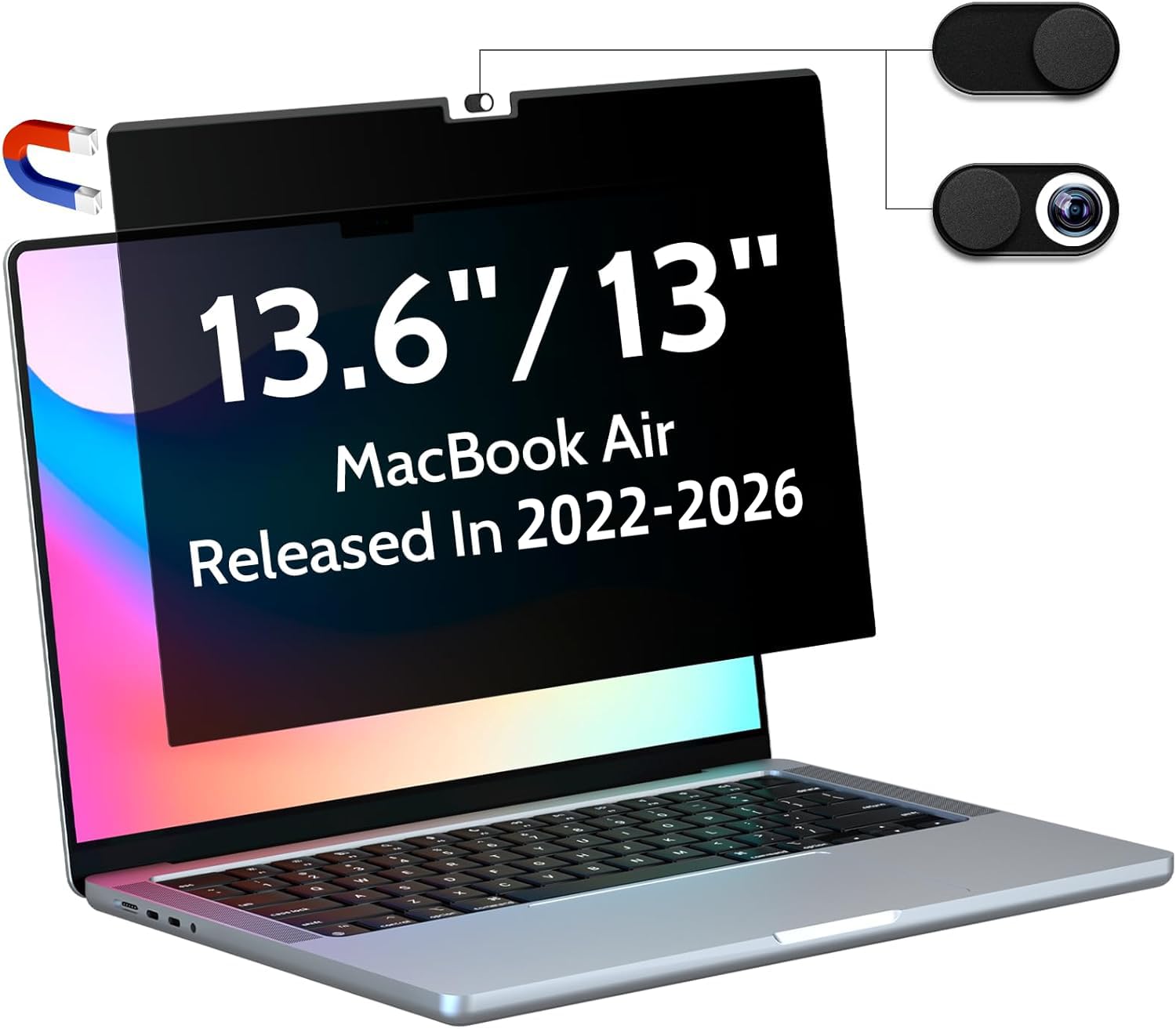
Most privacy filters rely on adhesive strips or a bezel frame that clips onto the lid. The Peslv uses a thin magnetic border that aligns with the MacBook Air's aluminum edges. That means no sticky residue, no wet installation, and no trapped dust. You just bring it close and it clicks into place. Taking it off is just as easy — grab a corner and lift. I probably removed and reattached it a dozen times in the first week, and it never lost its grip or left smudges.
View Deal on Amazon →
Because it's removable, you can keep it on only when you need it. That's a big deal for anyone who uses their MacBook for color-sensitive work like photo editing or design. Leave it on for the coffee shop, pop it off when you're back at your desk and need accurate colors. The screen itself is a matte finish, which cuts down on reflections from overhead lights and windows. It also has a blue light filtering layer, though you won't notice a huge color shift — more on that later.
Key Features & Specs in Plain English
Here's what you're actually getting: a privacy filter sized specifically for the 13.6-inch and 13-inch MacBook Air models from 2022 through 2026, including M2, M3, M4, and M5 chips. The magnetic attachment is the headline feature, but the matte coating is a close second. It reduces glare without the grainy look some cheap filters have. The blue light reduction is built into the film, so you don't need to enable Night Shift or wear blue-light glasses — though it's not a replacement for either if you're sensitive.
The privacy angle is roughly 60 degrees, meaning someone sitting shoulder-to-shoulder with you can still see a faint outline, but from the side the screen goes dark. That's typical for magnetic filters, which tend to be slightly less opaque than adhesive ones. The package includes the screen, a slim protective sleeve, and a microfiber cloth. No tools, no instructions needed — it's genuinely plug-and-play. One small thing: the filter adds about a millimeter of thickness to the lid, so it might not fit in a super-tight sleeve case. Worth checking if you use a form-fitting cover.
How It Holds Up in Real Life
I tested this on a 13.6-inch M2 MacBook Air during a week of coffee shop writing and a couple of flights. In the cafe, the matte finish did a great job killing glare from the window behind me — I could actually see the screen instead of my own reflection. The privacy effect was noticeable: when a friend sat at the next table and angled toward my screen, they said they could only see a dark rectangle. Up close and personal, though, someone leaning in from the side can still make out shapes. So don't expect spy-level secrecy.
The bigger trade-off is brightness. The filter dims the display by maybe 15–20%, which is normal for privacy screens. You'll likely bump up the brightness one or two notches. The matte texture also introduces a very subtle shimmer on pure white backgrounds — not a dealbreaker, but if you're a pixel-peeper, you'll notice it. On the plus side, the blue light filter didn't make everything look yellow or orange, which was a pleasant surprise. Colors stayed reasonably accurate, just slightly muted. And after two weeks of daily on-and-off use, the magnets still snapped firmly into place with no signs of wear.
Pros and Cons
Pros:
- Magnetic attachment is a game-changer — no adhesive, no bubbles, no residue.
- Matte finish genuinely reduces glare from windows and overhead lights.
- Removable in seconds, so you can switch between privacy and full color accuracy.
- Blue light filtering is subtle and doesn't distort colors much.
- Fits the latest MacBook Air models precisely, with a slim profile.
Cons:
- Dims the screen by about 15–20%, so you'll use more battery if you crank brightness.
- Privacy angle is good but not absolute — someone right next to you can still see a faint image.
- Adds a tiny bit of thickness that might not suit every snug case.
- The matte texture can cause a slight shimmer on white backgrounds.
Who It's For (and Who Should Skip It)
This is perfect for the mobile worker who camps out in cafes, libraries, or coworking spaces and wants to keep nosy neighbors from reading their email. It's also great for students in lecture halls or on crowded buses. If you frequently switch between privacy mode and color-critical work, the magnetic design is a lifesaver. Travelers will appreciate that it doesn't leave goo on the screen after a flight.
Skip it if you need hardcore privacy — like if you work with sensitive financial data and someone is literally leaning over your shoulder. In that case, a darker adhesive filter might be better. Also skip it if you're a color grader or photographer who needs every pixel at full brightness and zero texture. The slight dimming and shimmer will bug you. And if you never work in public, you probably don't need a privacy screen at all — save your money.
Value for Money
At around $30–$40 depending on where you buy, the Peslv sits in the middle of the pack for MacBook privacy filters. Adhesive versions can be cheaper, but they're one-time installs and often leave residue. Magnetic filters from bigger brands can cost $50 or more. The Peslv undercuts those while delivering the same core functionality. The build quality feels solid — the magnetic border is thin but strong, and the film hasn't scratched after a couple weeks of tossing it in a bag.
Is it worth it? If you value the ability to remove and reattach without hassle, absolutely. The convenience alone justifies the price for frequent travelers. That said, if you're on a tight budget and only need privacy occasionally, a cheap adhesive film might do the trick — just be ready for a fiddly install. For everyone else, this is a smart buy that solves a real problem without creating new ones.
Frequently Asked Questions
Does it work with the 13-inch MacBook Air M1 from 2020?
No, this version is specifically cut for the 13.6-inch and 13-inch models from 2022 onward (M2 and later). The M1 Air has a different screen size and bezel, so it won't align properly.
Will the magnets affect my MacBook's speakers or hard drive?
Not at all. The magnets are weak and localized to the bezel, and modern MacBooks use solid-state drives. You won't notice any interference with speakers, Wi-Fi, or the display.
Can I leave it on while charging or using a hub?
Yes, it doesn't block any ports or the MagSafe connector. It sits flush against the screen and doesn't interfere with closing the lid fully.
How do I clean it without damaging the matte coating?
Use the included microfiber cloth with a little water or screen cleaner. Avoid alcohol-based wipes, which can degrade the matte finish over time. A quick wipe every few days keeps it smudge-free.
Verdict
The Peslv Magnetic Privacy Screen is a smart, practical accessory for anyone who works on their MacBook Air in public. The magnetic attachment is the star — it's hassle-free, residue-free, and lets you switch between privacy and full clarity in seconds. The matte anti-glare finish is a nice bonus for bright environments, and the blue light filtering is subtle enough to not mess with your color perception. It's not perfect: the screen dims a bit, and the privacy angle won't stop a determined shoulder-surfer. But for everyday use in cafes, planes, and offices, it strikes a great balance between protection and convenience.
If that sounds like your life, go ahead and check it out. Your eyes (and your confidential emails) will thank you.